There's many videos warning about how electronic devices can track and/or spy on its owners, but these intrusions can be greatly mitigated, even in today's surveillance centric world. Nowadays everything has some form of surveillance tech in it. So this is a rough how-to guide to help users avoid as much of it as possible.
The obvious best way is to simply live without any of it, just like this Tech (born in 58) did for the first half of my life; I happily lived with nothing that had surveillance capabilities! I didn't get my first smartphone until Oct. of 2016 (an Honor 5X).
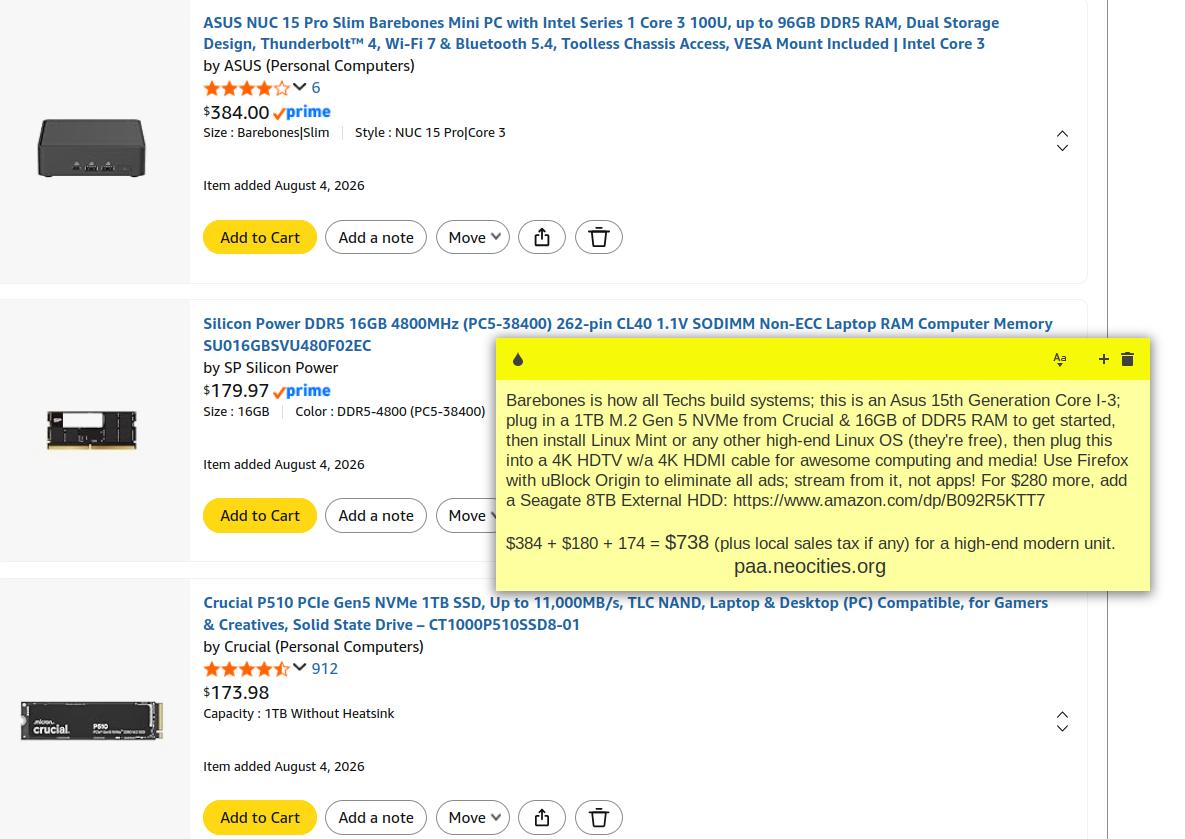
Nowadays I'm all Safe Tech with an e/OS phone (and home+phone $45mo), and Linux OS (only and on all devices), only on virgin hardware (sample system). I drove cars from 74 to 05, before volitionally going Car Free; all the cars I did own were made before 1997 (tech free); now they're easily tracked.
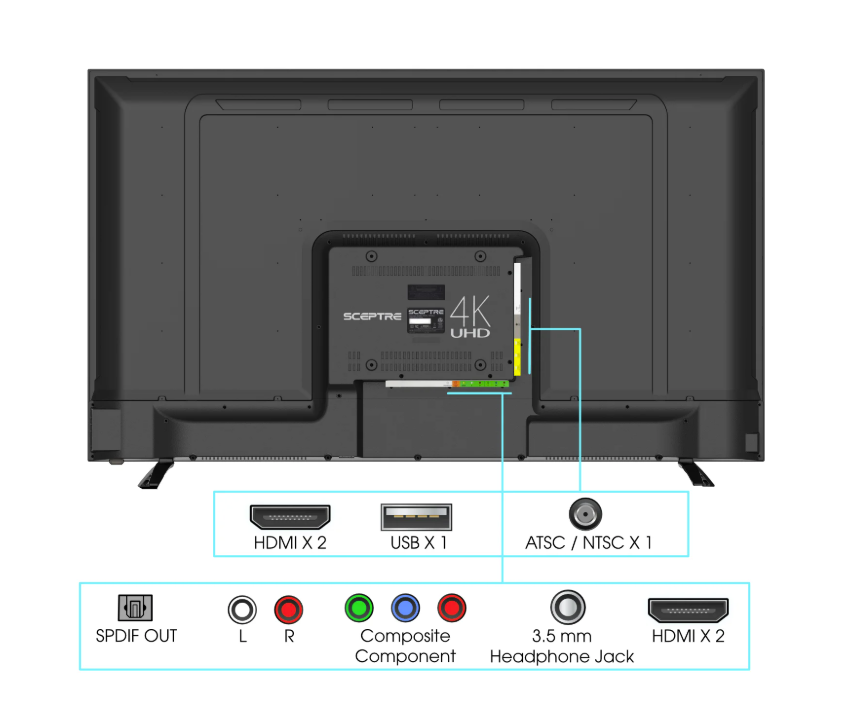
Smart TV's spy on you 🎥! Therefore, always get HDTV's without spying capabilities. Sceptre has been my favorite for 3 decades now; I bought my first TV/Monitor (in the late 90's) from LA based Sceptre via a local retailer while living in Metro LA. Click to enlarge this screenshot of a 50" Sceptre 4K sold at Walmart (ships free); no wireless. Just connect a clean Mini PC with a 4K HDMI cable, and an HDTV Antenna to its ATSC.
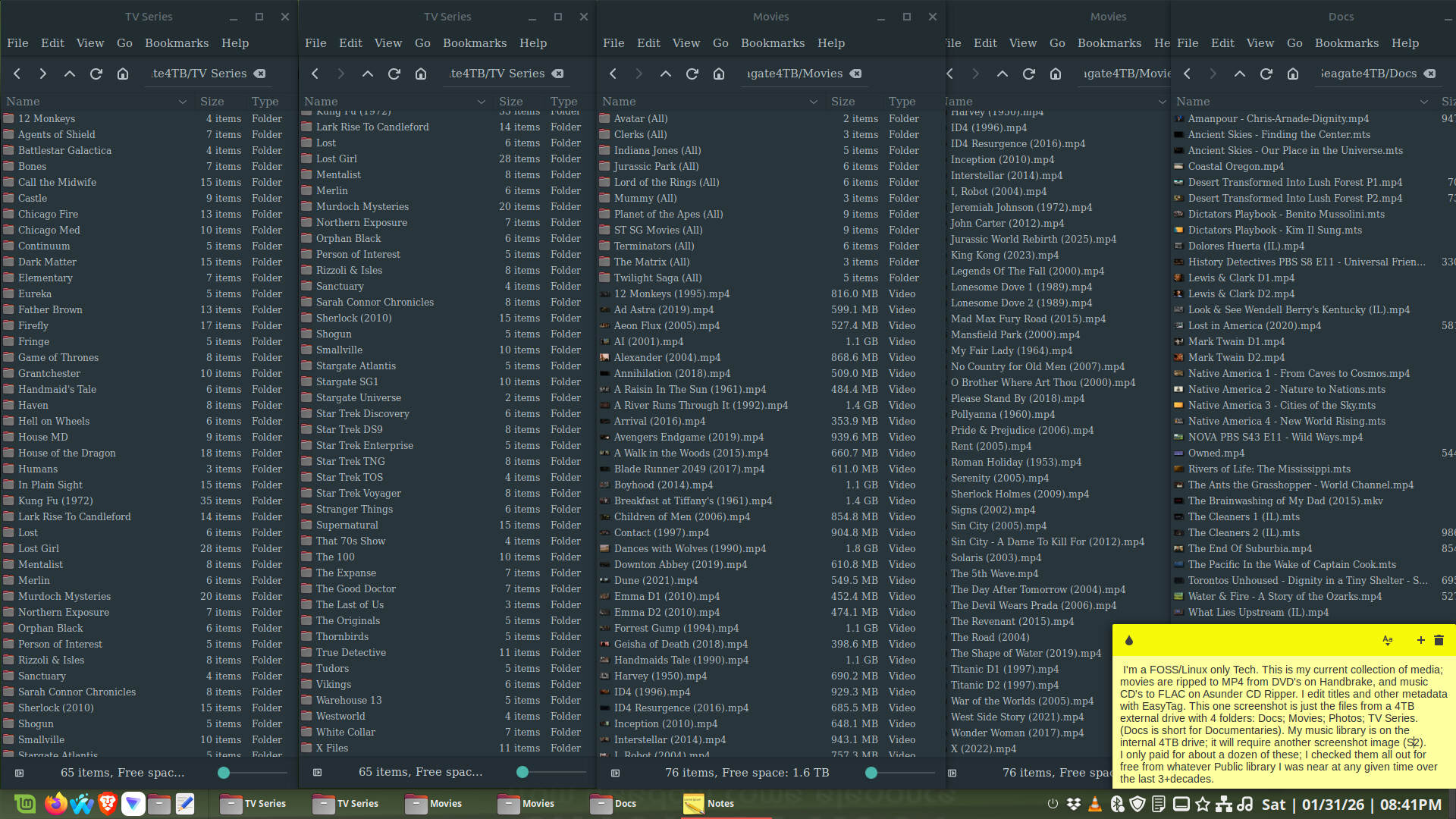
The antenna will pickup all broadcast channels in a viewing area. I only watch live sports, local news, the PBS News Hour, and a few one time programs that I do not want to check out from whatever local public library I'm nearby at the time. I'll rip/burn favorites to my massive collection, seen in images here and here and here and here and here.
Bill Gates Loses It as Windows 11 Users Threaten to Abandon Microsoft 🎥: That's because more people figured out their five-decade-long spying, plus their monetized ecosystem isolation (same with Apple). But breaching those Gates was not just individual users turning to Linux, it was more by Enterprise users (business; education) tired of Microsoft's endless demand for glitch ridden software updates and expensive hardware upgrades (e.g. the TPM debacle). Some turned to Google and Chrome, however, that's just another Big Tech ecosystem. Instead, move beyond MS and Google enterprise with open source and cloud native alternatives.
You may have noticed which AI search I prefer, but here's why I use Brave Search. And DDG has a NoAiDuckDuckGo option, and there's reasons for that as well. I do not use nor recommend dedicated AI entities.
But Brave features align better with my philosophy of using as little AI as possible. For this FOSS only Tech, the default browsers on my Linux only laptops and PC's are Firefox forks and Brave, which serves as my only Chromium based browser.
Brave browser uses Brave Search natively; it predominantly uses open source LLMs. On the Firefox forks it's default search is set at DuckDuckGo with no AI (its default setting). In Firefox, I employ uBlock Origin which blocks all ads, even on Brave Search results, so I don't see ads anywhere ever! But yes, I get that the ideals around "FOSS only" are disappearing; AI is directly or indirectly infiltrating everything.
For example, all AI browsers work by integrating large language models (LLMs) and AI agents directly into the browser's core architecture to transform the web from a passive resource into an active, interactive tool that acts on the user's behalf. Instead of merely displaying static links, these systems use LLM-based query interpretation to convert natural language commands into structured actions, allowing the browser to read, reason, and respond directly to user intent.
The underlying process relies on three key technical layers: real-time crawling and scraping to pull fresh data from the live internet, on-page context parsing using DOM and JavaScript analysis to understand relevant content, and autonomous agent execution to perform multi-step tasks like filling forms, comparing prices, or summarizing documents without constant human oversight. This enables the browser to handle complex workflows such as researching competitors, booking reservations, or organizing tabs, by mimicking human-like browsing behaviors while maintaining session security and context across sessions.
Key capabilities include Conversational Interaction,where users can ask questions or issue commands in natural language, with the AI providing direct answers, summaries, or translations instead of a list of blue links. With Task Automation, AI agents can autonomously navigate websites, extract data, fill out forms, and even complete multi-step purchases or research projects.
With Context Awareness the browser leverages open tabs, browsing history (with user opt-in), and current page content to provide personalized and relevant assistance. Privacy-Focused Execution, in some browsers like Brave with Leo or Perplexity's Comet, process data locally, or strip identifiers, so to ensure queries and chat logs are not stored or used to train models.
AI browsers ensure user privacy during autonomous tasks through a combination of technical and policy-based controls, but, they face significant challenges due to their inherent architecture. The core challenge is that AI agents operate with the user's full browsing privileges, including access to authenticated sessions across all websites. This means they can read, write, and navigate anywhere the user can, which bypasses traditional security models like Same-Origin Policy (SOP).
As a result, a compromised AI agent can become an "insider threat," capable of silently extracting sensitive data like emails and one-time passcodes through techniques like indirect prompt injection, where hidden malicious instructions on a webpage are processed as legitimate user commands. To mitigate these risks, AI browsers and security platforms employ several strategies:
• Runtime Policy Enforcement and Governance: Systems establish strict rules for what actions AI agents can perform, using AI-driven classification to block prompts that might lead to data leakage before they are processed.
• In-Browser Data Loss Prevention (DLP): Advanced DLP extends beyond file movement to monitor and block risky user-like actions such as copy/paste, screenshots, and uploads of sensitive information.
• Context Aware Monitoring and Auditing: Solutions continuously audit user prompts and AI responses in real-time to enforce compliance with policies (e.g., GDPR, HIPAA) and detect anomalous behavior, such as an agent accessing a CRM tab and attempting to exfiltrate data.
• Identity Isolation and Guardrail Injection: Best practices include segregating agent credentials from user credentials and applying pre- and post-prompt filters to sanitize inputs and outputs, preventing injection attacks and data leakage.
• User Controls and Transparency: Some browsers allow users to review and approve an AI's action plan before execution, disable data retention features, or use separate browser profiles to limit exposure.
But despite these measures, the fundamental design of agentic (AI) browsers, creates a new attack surface, and privacy ultimately depends on the specific implementation, and the user's or organization's ability, to enforce strict governance.
AI browser functionality can be disabled on Linux systems, with the method varying by browser. Firefox 148+ (released 2/24/26) introduced a dedicated "AI Controls" panel in settings that allows users to block all current and future AI features with a single toggle, or disable them individually (e.g., chat-bots, translations, tab suggestions). Forks like LibreWolf and Waterfox (my preferred) ship with AI features disabled by default, or offer builtin settings to prevent AI integration.